
AirNav Radar – Flight Tracker
AirNav SystemsTravel & Local
4.4166.00 Reviews
- Version
- 3.4.10
- Installs
- 1.00M
- Age Rating
- Everyone
Screenshots



Our Review of AirNav Radar – Flight Tracker
 Analysis by Appyee
Have you ever found yourself staring at the sky, watching a plane glide by and wondering where it’s headed? Well, I’ve got just the app for you! AirNav Radar – Flight Tracker is like having a personal air traffic control tower right on your phone. Let’s dive into why this app is so captivating for all you aviation enthusiasts out there!
Getting to Know AirNav Radar
First off, AirNav Radar is available on both Android and iOS, making it super accessible for everyone. The app is designed to give you real-time flight tracking, which is perfect for those who love keeping tabs on the skies. The interface is pretty straightforward, so you won’t need a pilot's license to navigate it.
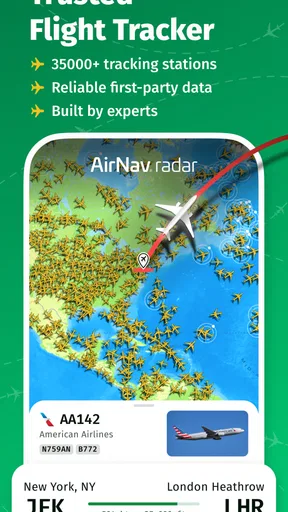
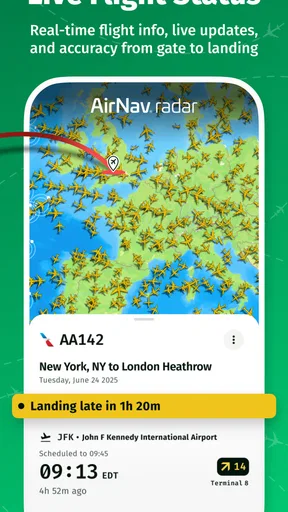
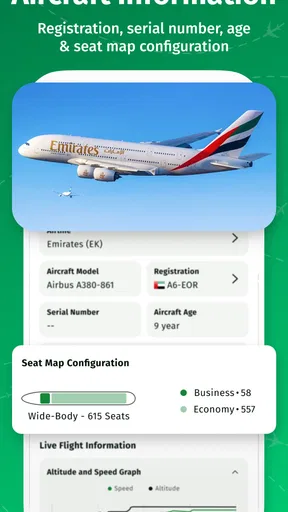
Once you’ve launched the app, you’re greeted with a world map dotted with planes. It’s almost like watching a live dance of aircraft, each one moving to its own rhythm. Tap on any plane, and voilà, details galore! You can see its destination, speed, altitude, and even the aircraft type. It’s like having a mini encyclopedia of aviation right at your fingertips.
Features That Soar
Now, let’s talk about the features. One of the coolest things about AirNav Radar is its ability to show you 3D views of aircraft. Imagine watching a plane from a pilot’s perspective—it’s an experience that’s both thrilling and educational.
Another feature that stands out is the comprehensive flight history. If you’re curious about a specific plane’s journey over the past week, the app has you covered. Plus, the app sends you alerts about flight status changes, so you’re always in the know. No more wondering if your friend’s flight is delayed—you’ll be the first to tell them!
User Experience and Design
When it comes to design, AirNav Radar keeps things simple yet effective. The interface isn’t cluttered, which I appreciate because it makes finding information a breeze. The sleek design ensures that you’re not overwhelmed with data. Instead, everything is right where you expect it to be.
For those who love to customize, the app offers options to change map styles and filter flights by airline or aircraft type. This personalization makes the experience even more engaging, especially if you’re tracking specific flights regularly.
From First-Week Curiosity to a Useful Habit
The first few sessions are naturally the most absorbing. I can open the map for a minute, select a plane, and end up following its route longer than I intended. That novelty is real, but lasting value depends on giving the app a job beyond casual sky-watching. I find it more useful when I have a reason to check it: meeting someone at an airport, watching a flight pass overhead, or learning how routes connect across a region.
For a practical example, imagine a family member is flying in and you’re deciding when to leave home. I’d use the tracker to follow the aircraft’s progress, then still check the airline or airport’s own information before changing plans. The map can make a flight’s movement easier to understand, while official travel channels remain the sensible place to confirm gate, baggage, or pickup details. That distinction keeps the app helpful without asking it to replace tools built for airport logistics.
There’s also a nice learning workflow here: choose one aircraft, note its route and type, then compare what you see with another flight on a similar path. The value is not just knowing that a plane is nearby; it’s noticing how many aircraft share busy corridors and how their journeys differ. I’d avoid trying to interpret every displayed detail as a prediction, though. A live map is best treated as a view of activity, not a promise that a flight will arrive at an exact time.
Month-to-Month Value and Who It Suits
After the initial excitement fades, I think this app earns space on a phone most easily for people with recurring reasons to look up flights. Aviation enthusiasts can use it as an exploratory map, while frequent travelers may appreciate having a quick way to see a flight’s progress. It can also be a fun shared activity with a child or a curious passenger: pick a plane in the distance and use its route as a starting point for questions about where it came from and where it is going.
If you only need to know whether one booked flight is delayed, a carrier’s app or airport information may be the faster choice. Those tools are organized around your booking and airport tasks, whereas AirNav Radar is more compelling when you want the wider picture. For everyday use, I’d keep it as a companion rather than the sole source for travel decisions. That division gives it a clear purpose and avoids expecting a flight map to handle reservations or terminal changes.
The app is free to install, and its travel-focused audience is reflected in its 4.4 average from around 6,200 ratings and more than a million installs. AirNav Systems is the developer. Optional in-app purchases range from $2.99 to $599.99 per item, so I’d check what a purchase includes before spending. The free starting point makes casual exploration easy, but anyone considering paid options should decide first whether they need a specific capability often enough to justify it.
Keeping the App Useful Without Making It a Chore
A tracking app can become noisy if I leave every possible alert active or open it whenever a plane appears overhead. I’d start with one clear purpose—such as following a particular flight—and enable only the notifications that support that purpose. If I stop using an alert, I’d turn it off rather than letting it become background noise. That small bit of housekeeping helps preserve the app’s usefulness instead of making it feel like another source of interruptions.
Filters can also make a difference to how long I want to spend looking at the map. Rather than scanning all visible traffic, I’d narrow the view by airline or aircraft type when I have a particular question. A useful trade-off is that filtering makes a busy map easier to read but can hide activity I might otherwise notice. I’d clear the filter when I’m done, especially if I’m handing the phone to someone else, so they don’t mistake a narrowed view for the whole picture.
For quick outdoor spotting, I’d open the map before settling into a long look at the screen, identify a likely flight, and then put the phone down to watch the sky. That keeps the app from turning a simple moment into constant tapping. On a slow day, there may be little reason to keep checking; the tracker is more rewarding when curiosity or a real travel question gives it a focus.
Limits, Costs, and the Right Alternative
There is a learning curve beneath the approachable map. Aircraft labels, routes, and flight details can be a lot to take in if you only want a quick answer, and the amount of information that feels exciting to an enthusiast may feel busy to an occasional user. I’d start by selecting a plane and reading only the details that answer my question, rather than treating every field as something I need to understand immediately.
Another practical limitation is that a moving marker should not be confused with a guaranteed schedule update. If a pickup depends on a flight’s arrival, I’d use the tracker to follow progress and confirm important changes through the airline or airport. Likewise, if the goal is managing a booking, checking in, or finding terminal instructions, a travel provider’s own app is a more direct tool. AirNav Radar’s strength is visual awareness of aircraft, not being an all-purpose travel organizer.
It may also be the wrong fit if you rarely wonder about aircraft and prefer a very simple answer to a one-off flight question. In that case, a search engine or carrier notification can involve less browsing. On the other hand, someone who enjoys tracing routes, comparing aircraft, or watching nearby traffic is likely to return to this app after the novelty period. The best test is whether you can name a recurring reason to open it; if you can’t, it may remain an occasional curiosity rather than a daily essential.
Why Download AirNav Radar?
So, why should you download this app? If you’re an aviation geek or just someone who travels a lot, AirNav Radar is like having a bird’s-eye view of the skies. It’s incredibly informative and can turn a mundane waiting room experience into a fascinating journey through the airways.
AirNav Radar is rated for Everyone, and its current version is 3.2.5, with a minimum operating-system requirement of 7.0. Those details make it easier to judge whether it fits a household device before installing. I’d still think about the intended user: younger users may enjoy the moving map, while travelers should understand that it complements rather than replaces their airline’s updates. Used with that expectation, it can suit both a curious observer and someone keeping an eye on a trip.
Beyond just tracking flights, the app connects you with a global community of aviation enthusiasts. You can share insights, discuss flight patterns, and even get tips on spotting rare aircraft. It’s a social experience wrapped in a technological marvel.
Final Thoughts
All in all, AirNav Radar – Flight Tracker is a fantastic app that transforms the way you view air travel. Whether you’re tracking your loved one's flight or simply exploring the skies from your couch, this app has something for everyone. It’s not just about following planes; it’s about understanding the intricate ballet of global aviation. So, next time you see a plane soaring high above, you’ll know exactly where it’s headed. Isn’t that just the coolest thing?
Verdict
Strengths of AirNav Radar – Flight Tracker
- Real-time flight tracking available.
- User-friendly interface design.
- Comprehensive aircraft details.
- Customizable alerts for flights.
- Global coverage with high accuracy.
Limitations of AirNav Radar – Flight Tracker
- Premium features require subscription.
- Occasional lag in data updates.
- Limited offline functionality.
- Ads can be intrusive at times.
- Heavy battery consumption.
Similar Picks in This Category
View All
Google Maps
Google LLC3.4

Google Maps Go
Google LLC4.1

Booking.com: Hotels & Travel
Booking.com Hotels & Vacation Rentals4.8

Google Earth
Google LLC3.8

Skyscanner Flights Hotels Cars
Skyscanner Ltd4.8

trivago: Compare hotel prices
trivago N.V.4.4
Frequently Asked Questions
What features does AirNav Radar – Flight Tracker offer?
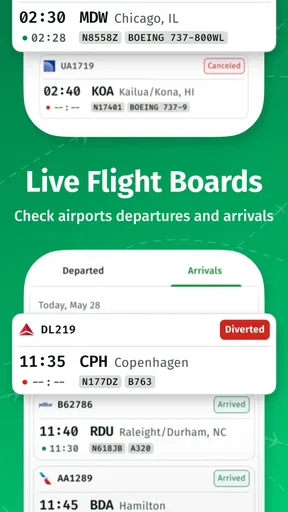
AirNav Radar – Flight Tracker provides comprehensive real-time flight tracking, allowing users to view live air traffic worldwide. It includes detailed flight information, such as aircraft speed, altitude, and route. Additionally, the app offers historical data, weather overlays, and customization options for alerts and notifications, ensuring users stay updated on specific flights of interest.
Is AirNav Radar – Flight Tracker easy to use for beginners?
Yes, the app is designed with a user-friendly interface that makes it accessible for both aviation enthusiasts and beginners. It features intuitive navigation, with clear labels and a helpful tutorial that guides new users through its functionalities. The customizable map and simple search options make it easy to track flights quickly and efficiently.
Does AirNav Radar – Flight Tracker require an internet connection?
Yes, an internet connection is necessary for AirNav Radar – Flight Tracker to provide real-time updates and accurate flight tracking. The app relies on live data streams to deliver up-to-date information. A stable Wi-Fi or mobile data connection ensures the best performance and helps prevent any interruptions during tracking.
Can I receive alerts for specific flights with AirNav Radar – Flight Tracker?
Absolutely, the app allows users to set up custom alerts for specific flights, ensuring you receive notifications about changes in flight status, such as departures, arrivals, or delays. This feature is particularly useful for travelers wanting to keep tabs on their own flights or for those tracking friends or family members traveling by air.
Is AirNav Radar – Flight Tracker available on both Android and iOS?
Yes, AirNav Radar – Flight Tracker is available for download on both Android and iOS platforms. Users can find the app on the Google Play Store and the Apple App Store. The app is optimized for various devices, ensuring a seamless experience across smartphones and tablets with regular updates to improve functionality.
